Building a REST API with AWS API Gateway & Lambda
Part 2 of 7 in a series on building a serverless backend with AWS SAM. Previous: AWS Serverless Architecture with SAM. Next: Storing AWS SQS messages to DynamoDB with AWS Lambda.
In my last post I covered the overall architecture we are building and how to get setup with SAM CLI locally & deploy the app to AWS.
Setting up a virtual environment
Since we will be using python to build our app, lets create a virtual environment where we can install all our dependencies.
Create a new virtual environment
python -m venv venv
Activate the environment
source venv/bin/activate
Install the dependencies
pip install -r src/requirements.txt
Customize the application
Rename the folder “hello_world” to “src”
Rename app.py to create.py
In the Dockerfile, update the reference to app.py and remove the CMD statement. The Dockerfile should look like this -
FROM public.ecr.aws/lambda/python:3.9
COPY create.py ${LAMBDA_TASK_ROOT}
COPY requirements.txt ${LAMBDA_TASK_ROOT}
RUN python3.9 -m pip install -r requirements.txt -t .
Update the contents of template.yml to the following - template.yaml
AWSTemplateFormatVersion: '2010-09-09'
Transform: AWS::Serverless-2016-10-31
Description: >
  python3.9

  Sample SAM Template for serverless-arch-example

# More info about Globals: https://github.com/awslabs/serverless-application-model/blob/master/docs/globals.rst
Globals:
  Function:
    Timeout: 120
    MemorySize: 2048

Resources:
  CreateFunction:
    Type: AWS::Serverless::Function # More info about Function Resource: https://github.com/awslabs/serverless-application-model/blob/master/versions/2016-10-31.md#awsserverlessfunction
    Properties:
      PackageType: Image
      ImageConfig:
        Command:
          - create.lambda_handler
      Architectures:
        - x86_64
      Events:
        CreateAPI:
          Type: Api # More info about API Event Source: https://github.com/awslabs/serverless-application-model/blob/master/versions/2016-10-31.md#api
          Properties:
            Path: /example/create
            Method: post
    Metadata:
      Dockerfile: Dockerfile
      DockerContext: ./src
      DockerTag: python3.9-v1

Outputs:
  # ServerlessRestApi is an implicit API created out of Events key under Serverless::Function
  # Find out more about other implicit resources you can reference within SAM
  # https://github.com/awslabs/serverless-application-model/blob/master/docs/internals/generated_resources.rst#api
  CreateAPI:
    Description: "API Gateway endpoint URL for Prod stage for Create function"
    Value: !Sub "https://${ServerlessRestApi}.execute-api.${AWS::Region}.amazonaws.com/Prod/example/create"
  CreateFunction:
    Description: "Create Lambda Function ARN"
    Value: !GetAtt CreateFunction.Arn
  CreateFunctionIamRole:
    Description: "Implicit IAM Role created for Create function"
    Value: !GetAtt CreateFunctionRole.Arn
We now update create.py to accept a POST request and return a request ID for tracking. create.py
import json


def lambda_handler(event, context):

    if event['httpMethod'] != "POST":
        return generate_response(404, "Invalid request method")

    request = json.loads(event['body'])
    if not validate_payload(request):
        return generate_response(404, "Invalid payload")

    # use lambda request id for better tracking purposes
    request['request_id'] = context.aws_request_id
    request_json = json.dumps(request)
    print(f"Processing request with Request Id: {request['request_id']}")

    return generate_response(200, request_json)

def validate_payload(json_map):
    keys = json_map.keys()
    payload_valid = True

    # Check if required keys are in json_map
    keys_required = {'url'}
    for key in keys_required:
        if key not in keys:
            payload_valid = False
            break

    if str(json_map['url']).strip() == '':
        return False

    return payload_valid

def generate_response(response_code, message):
    return {
        "statusCode": response_code,
        "body": message,
        "headers": {
            'Content-Type': 'application/json',
            'Access-Control-Allow-Origin': '*',
            'Access-Control-Allow-Headers': '*',
            "Access-Control-Allow-Methods": "POST"
        }
    }
Build & test the app
Build the app with the following command -
sam build
Test the app locally, run the following command to expose the endpoint -
sam local start-api
You should see the following output -

We can now test the endpoint by making a POST request using POSTMAN with the request body -
{
   "url": "https://www.google.com/search?q=random+search"
}
The response back should contain the url and a request_id -
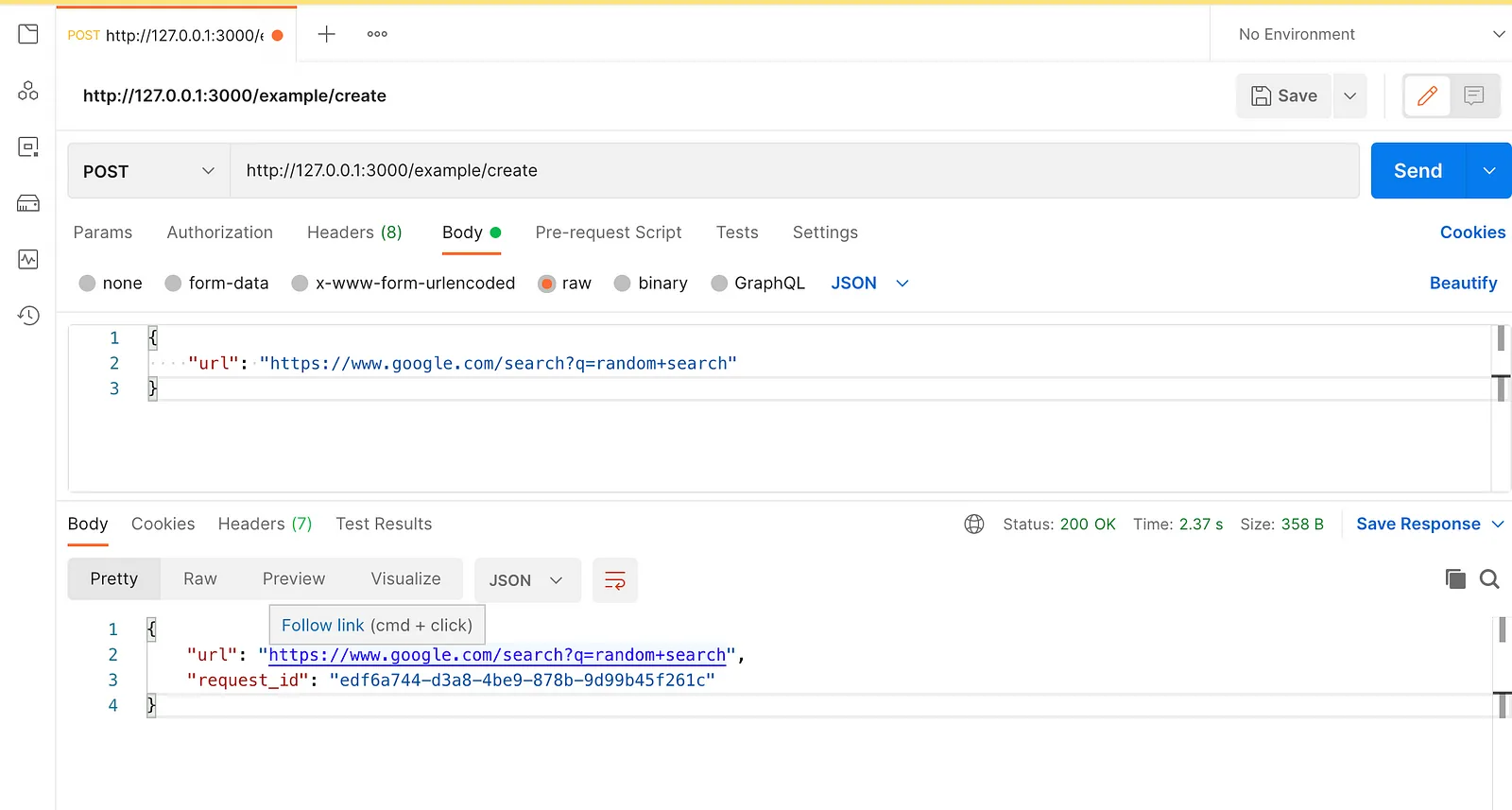
Deploy the app
Deploy the app to AWS using the following command -
sam deploy --guided
If you followed the steps from my previous post, you should already have a samconfig.toml file generated. Delete that file before running the above command so that we can setup our deploy config from scratch.
Choose the following options in the interactive session -
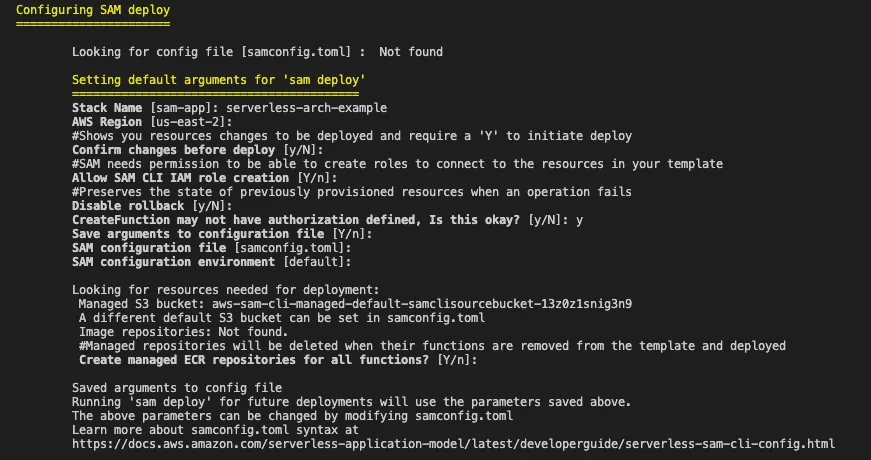
If the deployment succeeded, you should see the following output -
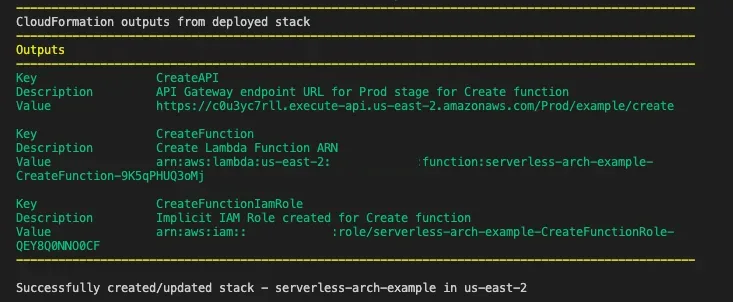
This will create the samconfig.toml file again with the configs stored. For subsequent deployments you can simply run sam deploy to deploy the app.
Testing the deployed app
Use the API URL from the output and test the POST call from postman.
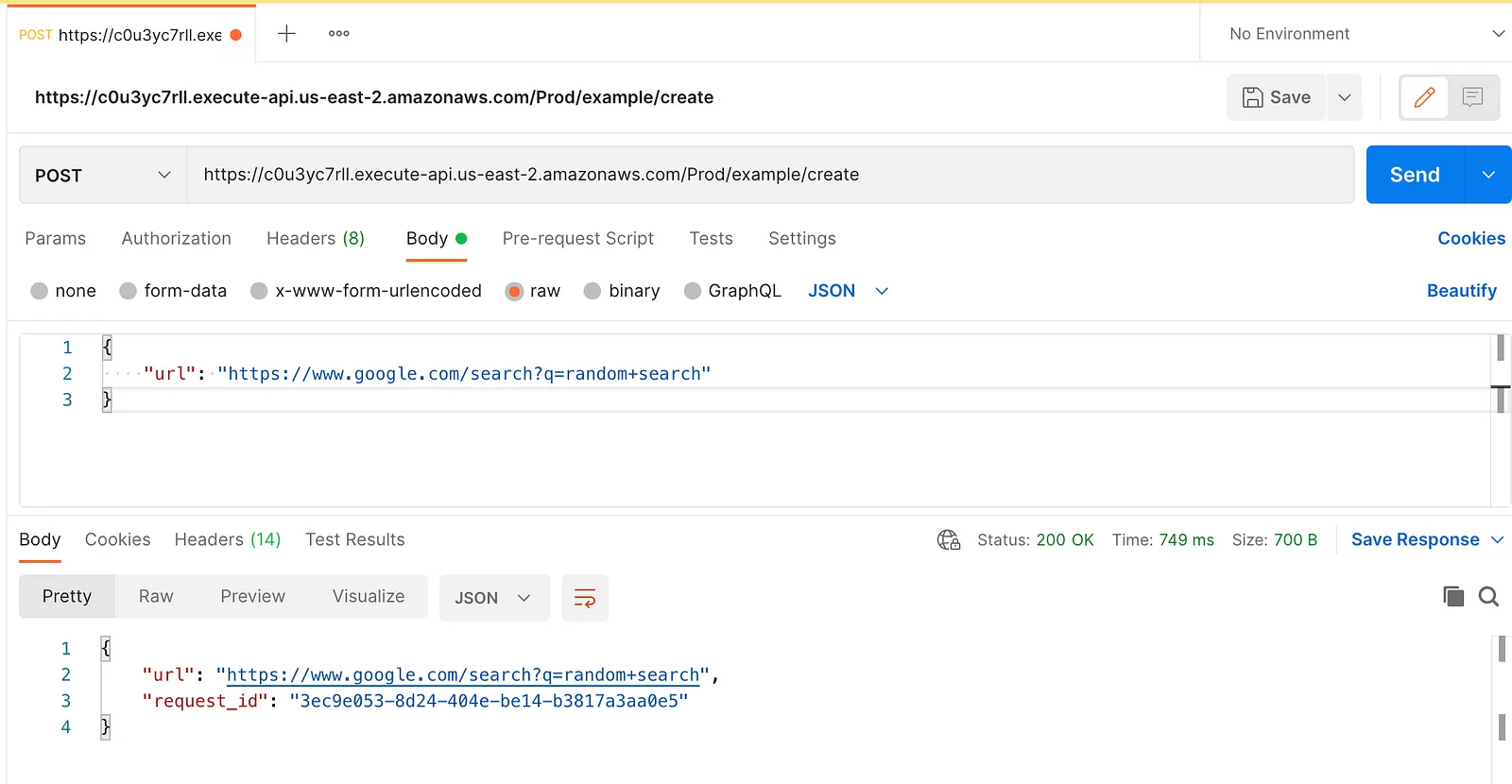
Note: The url should be copied from the output as-is. The url is case-sensitive and any trailing spaces can also result in a 403 response.
Source Code
Here is the source code for the project created here.
Next: Part 3: Storing AWS SQS messages to DynamoDB with AWS Lambda