Downloading a file from S3 using API Gateway & AWS Lambda
Part 6 of 7 in a series on building a serverless backend with AWS SAM. Previous: Writing a CSV to S3 from AWS Lambda. Next: AWS Lambda & ECR nuances.
In my last post I showed how we can create and store a csv file in an S3 bucket. Let us now see how we can get the status of a request & get a downloadable link to the csv for completed requests.
The Get Status lambda
Under the src directory, create a new file called “get_status.py” with the below code - get_status.py
from db import db_helper
import boto3
import json
import os
from botocore.exceptions import ClientError
from datetime import datetime

def lambda_handler(event=None, context=None):

    if event['httpMethod'] != "GET":
        return generate_response(404, "Invalid request method")

    query_params = event['queryStringParameters']

    if not validate_params(query_params):
        return generate_response(404, "Invalid request")

    try:
        dbHelper = db_helper.DBHelper()
        response = dbHelper.get_order_status(query_params['request_id'])
        print(response)
        if response is None or len(response) == 0:
            return generate_response(404, f"Request not found")

        presigned_url = None
        if response[0]['status'] == 'Complete':
            upload_bucket_name = os.environ['UPLOAD_BUCKET']
            presigned_url = create_presigned_url(upload_bucket_name, response[0]['file_location'])

        return generate_response(200, {
            "url": response[0]['url'],
            "request_id": response[0]['request_id'],
            "status": response[0]['status'],
            "updated": datetime.fromtimestamp(response[0]['epoch_time']).strftime('%Y-%m-%d %H:%M:%S'),
            "download_link": presigned_url
        })


    except Exception as e:
        print(e)
        return generate_response(500, f"Error processing request: {e}")

def generate_response(response_code, message):
    return {
        "statusCode": response_code,
        "body": json.dumps(message),
        "headers": {
            "Access-Control-Allow-Headers" : "Content-Type",
            "Access-Control-Allow-Origin": "*",
            "Access-Control-Allow-Methods": "GET"
        }
    }

def validate_params(query_params):
    payload_valid = True
    # Check if required keys are in json_map
    keys_required = {'request_id'}
    for key in keys_required:
        if key not in query_params:
            payload_valid = False
            break

    # Check if all the values are strings
    return payload_valid

def create_presigned_url(bucket_name, object_name, expiration=3600):
    """Generate a presigned URL to share an S3 object

    :param bucket_name: string
    :param object_name: string
    :param expiration: Time in seconds for the presigned URL to remain valid
    :return: Presigned URL as string. If error, returns None.
    """

    # Generate a presigned URL for the S3 object
    s3_client = boto3.client('s3')
    try:
        response = s3_client.generate_presigned_url('get_object',
                                                    Params={'Bucket': bucket_name,
                                                            'Key': object_name},
                                                    ExpiresIn=expiration)
    except ClientError as e:
        print(e)
        return None

    # The response contains the presigned URL
    return response
Add the new file to Dockerfile -
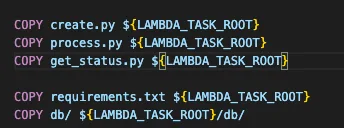
Update the template.yaml file and add a new resource - template.yaml
AWSTemplateFormatVersion: '2010-09-09'
Transform: AWS::Serverless-2016-10-31
Description: >
  python3.9

  Sample SAM Template for serverless-arch-example

Parameters:
  Environment:
    Type: String
    Description: AWS Environment where code is being executed (AWS_SAM_LOCAL or AWS)
    Default: 'AWS'

  DynamoDBUri:
    Type: String
    Description: AWS local DynamoDB instance URI (will only be used if AWSENVNAME is AWS_SAM_LOCAL)
    Default: 'http://docker.for.mac.host.internal:8000'

  ProjectName:
    Type: String
    Description: 'Name of the project'
    Default: 'serverless-arch-example'

# More info about Globals: https://github.com/awslabs/serverless-application-model/blob/master/docs/globals.rst
Globals:
  Function:
    Timeout: 120
    MemorySize: 2048
    Environment:
      Variables:
        ENVIRONMENT: !Ref Environment
        DYNAMODB_DEV_URI: !Ref DynamoDBUri
        ORDERS_TABLE_NAME: !Ref OrdersTable
        SQS_QUEUE: !Ref OrdersQueue
        UPLOAD_BUCKET: !Ref OrdersBucket

Resources:
  OrdersBucket:
    Type: AWS::S3::Bucket
    Properties:
      BucketName: !Join ['-', [!Sub '${ProjectName}', 'csvs']]
      LifecycleConfiguration:
        Rules:
          - Id: DeleteContentAfterADay
            ExpirationInDays: 1
            Status: Enabled
      CorsConfiguration:
        CorsRules:
        - AllowedHeaders:
            - "*"
          AllowedMethods:
            - GET
            - PUT
            - POST
            - DELETE
            - HEAD
          AllowedOrigins:
            - "*"
  OrdersTable:
    Type: AWS::DynamoDB::Table
    Properties:
      TableName: !Join ['-', [!Sub '${ProjectName}', 'orders']]
      AttributeDefinitions:
        - AttributeName: request_id
          AttributeType: S
      KeySchema:
        - AttributeName: request_id
          KeyType: HASH
      ProvisionedThroughput:
        ReadCapacityUnits: 3
        WriteCapacityUnits: 3
  OrdersQueue:
    Type: AWS::SQS::Queue
    Properties:
      QueueName: !Join ['-', [!Sub '${ProjectName}', 'orders']]
      VisibilityTimeout: 120  # must be same as lambda timeout

  CreateFunction:
    Type: AWS::Serverless::Function # More info about Function Resource: https://github.com/awslabs/serverless-application-model/blob/master/versions/2016-10-31.md#awsserverlessfunction
    Properties:
      PackageType: Image
      ImageConfig:
        Command:
          - create.lambda_handler
      Architectures:
        - x86_64
      Events:
        CreateAPI:
          Type: Api # More info about API Event Source: https://github.com/awslabs/serverless-application-model/blob/master/versions/2016-10-31.md#api
          Properties:
            Path: /example/create
            Method: post
      Policies:
        - AmazonDynamoDBFullAccess
        - SQSSendMessagePolicy:
            QueueName: !GetAtt OrdersQueue.QueueName
    Metadata:
      Dockerfile: Dockerfile
      DockerContext: ./src
      DockerTag: python3.9-v1

  ProcessFunction:
    Type: AWS::Serverless::Function # More info about Function Resource: https://github.com/awslabs/serverless-application-model/blob/master/versions/2016-10-31.md#awsserverlessfunction
    Properties:
      FunctionName: !Join ['-', [!Sub '${ProjectName}', 'process']]
      PackageType: Image
      ImageConfig:
        Command:
          - process.lambda_handler
      Architectures:
        - x86_64
      Policies:
        - AmazonDynamoDBFullAccess
        - S3CrudPolicy:
            BucketName: !Ref OrdersBucket
      Events:
        SqsEvent:
          Type: SQS
          Properties:
            Queue: !GetAtt OrdersQueue.Arn
            BatchSize: 1
    Metadata:
      Dockerfile: Dockerfile
      DockerContext: ./src
      DockerTag: python3.9-v1
  GetStatusFunction:
    Type: AWS::Serverless::Function # More info about Function Resource: https://github.com/awslabs/serverless-application-model/blob/master/versions/2016-10-31.md#awsserverlessfunction
    Properties:
      FunctionName: !Join ['-', [!Sub '${ProjectName}', 'get-status']]
      PackageType: Image
      ImageConfig:
        Command:
          - get_status.lambda_handler
      Architectures:
        - x86_64
      Policies:
        - AmazonDynamoDBFullAccess
        - S3WritePolicy:
            BucketName: !Ref OrdersBucket
        - S3ReadPolicy:
            BucketName: !Ref OrdersBucket
      Events:
        GetStatusAPI:
          Type: Api
          Properties:
            Path: /example/get-status
            Method: get
    Metadata:
      Dockerfile: Dockerfile
      DockerContext: ./src
      DockerTag: python3.9-v1

Outputs:
  # ServerlessRestApi is an implicit API created out of Events key under Serverless::Function
  # Find out more about other implicit resources you can reference within SAM
  # https://github.com/awslabs/serverless-application-model/blob/master/docs/internals/generated_resources.rst#api
  CreateAPI:
    Description: "API Gateway endpoint URL for Prod stage for Create function"
    Value: !Sub "https://${ServerlessRestApi}.execute-api.${AWS::Region}.amazonaws.com/Prod/example/create"
  CreateFunction:
    Description: "Create Lambda Function ARN"
    Value: !GetAtt CreateFunction.Arn
  CreateFunctionIamRole:
    Description: "Implicit IAM Role created for Create function"
    Value: !GetAtt CreateFunctionRole.Arn
  OrdersTable:
    Description: "DynamoDB Table for orders"
    Value: !GetAtt OrdersTable.Arn
  OrdersQueue:
    Description: "SQS Queue for orders"
    Value: !GetAtt OrdersQueue.Arn
  ProcessFunction:
    Description: "Process Lambda Function ARN"
    Value: !GetAtt ProcessFunction.Arn
  OrdersBucket:
    Description: "S3 bucket for Orders"
    Value: !GetAtt OrdersBucket.Arn
  GetStatus:
    Description: "API Gateway endpoint URL for Prod stage for Get Status function"
    Value: !Sub "https://${ServerlessRestApi}.execute-api.${AWS::Region}.amazonaws.com/Prod/example/get-status"
  GetStatusFunction:
    Description: "Get Status Lambda Function ARN"
    Value: !GetAtt GetStatusFunction.Arn
  GetStatusFunctionIamRole:
    Description: "Implicit IAM Role created for Get Status function"
    Value: !GetAtt GetStatusFunctionRole.Arn
Testing locally
We can test the endpoint locally, but before that we need to update the env.json and include the S3 bucket name -
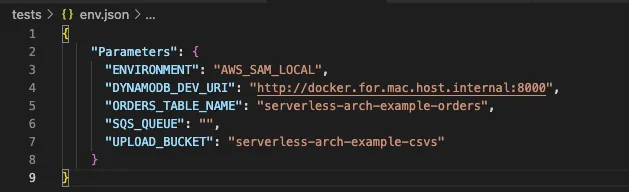
Build and start the api locally -
sam build
sam local start-api --env-vars ./tests/env.json
You should see an output like -

Trigger a new request & grab the request id from the DB (since the post will fail without an SQS queue defined). Then test the get status call -
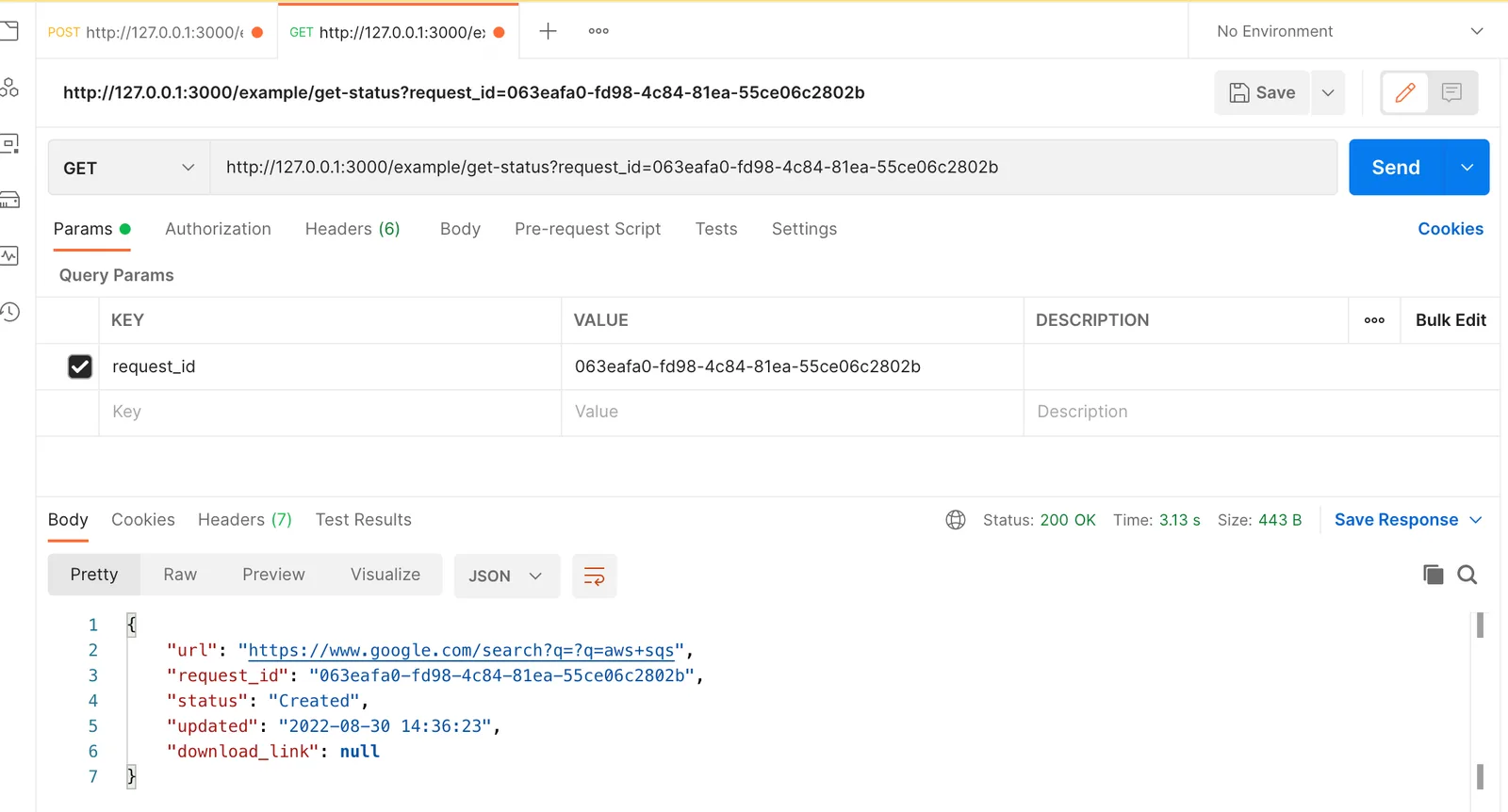
Deploying the code
Just like before, we need to specify an image repository for the new lambda function. Update the samconfig.toml file and add another item to the image_repositories list for GetStatusFunction -
image_repositories = ["CreateFunction=123456789012.dkr.ecr.us-east-2.amazonaws.com/serverlessarchexample8b9687a4/createfunction286a02c8repo",
"ProcessFunction=123456789012.dkr.ecr.us-east-2.amazonaws.com/serverlessarchexample8b9687a4/createfunction286a02c8repo",
"GetStatusFunction=123456789012.dkr.ecr.us-east-2.amazonaws.com/serverlessarchexample8b9687a4/createfunction286a02c8repo"]
Deploy the code to aws -
sam build
sam deploy
The output should look like this -
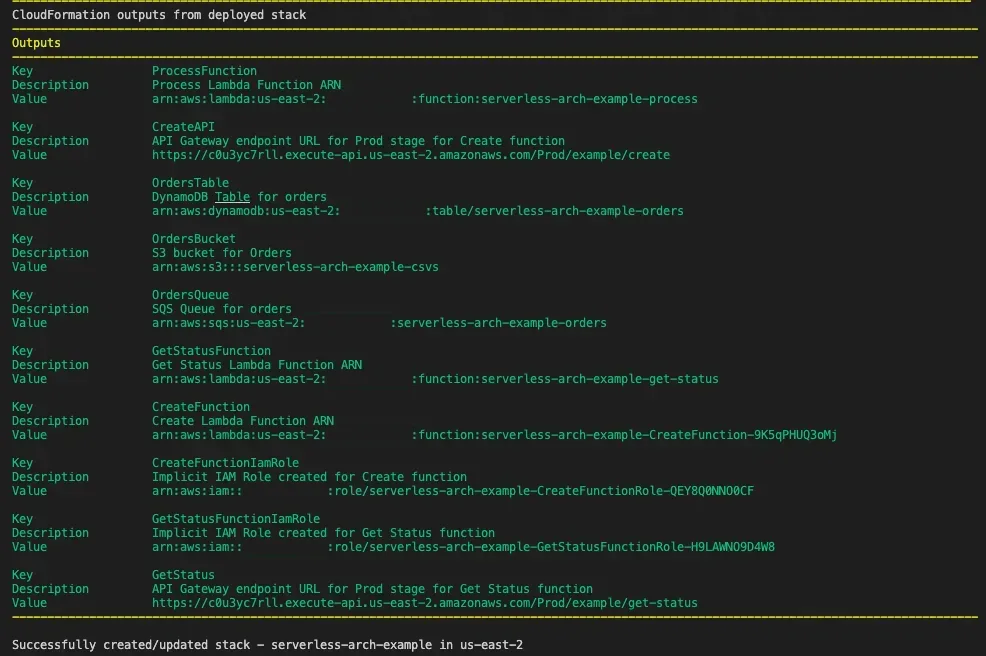
Grab the get-status endpoint url and try making a request through postman for one of the completed orders from before -
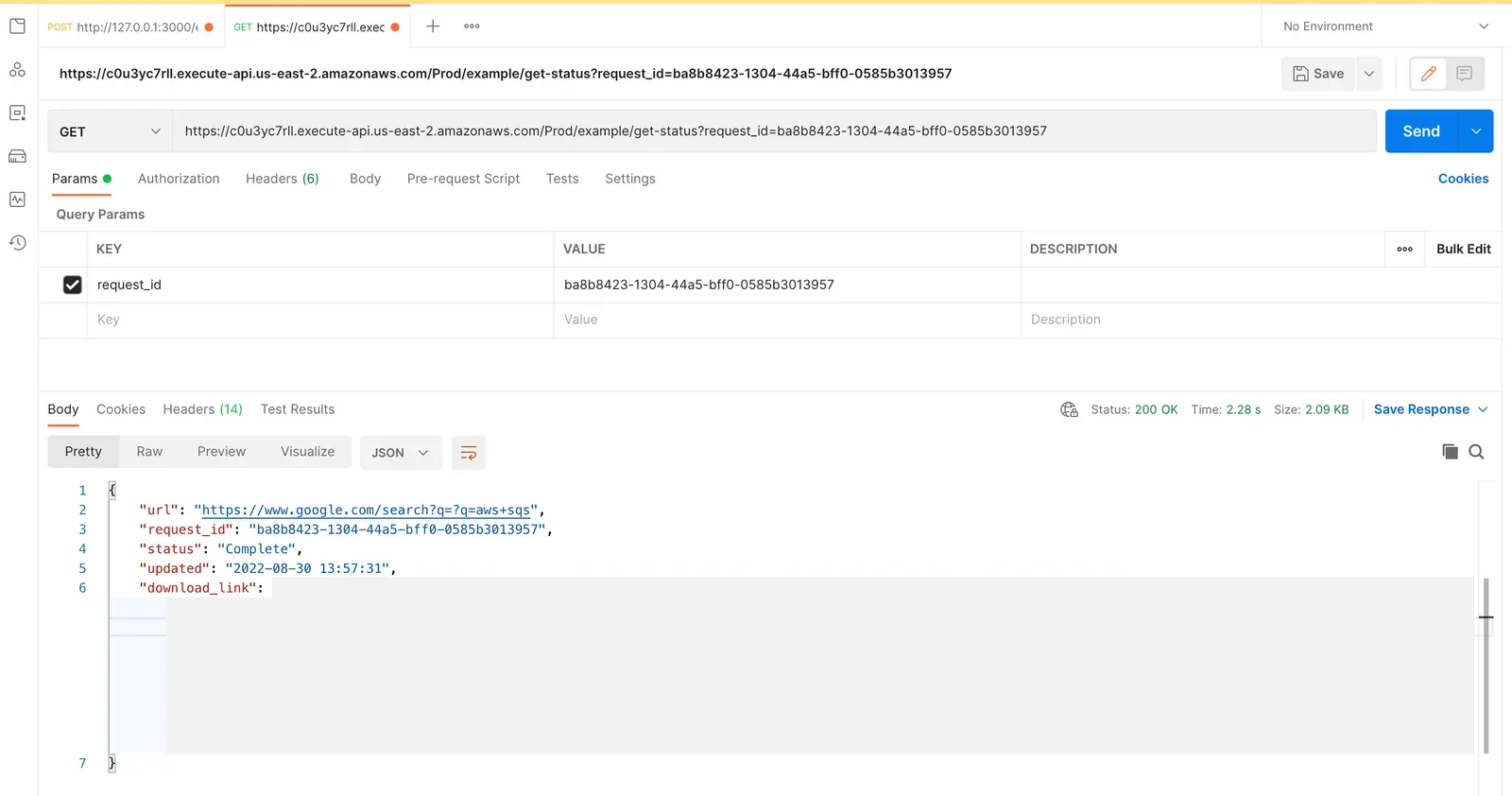
Cmd+Click on the download_link to download the csv file from S3.
And thats it! The SAM CLI has enabled us to leverage infrastructure-as-code to deploy our entire architecture to any aws account within minutes!
Source Code
Here is the source code for the project created here.
Next: Part 7: AWS Lambda & ECR nuances