Web Scraping with Selenium & AWS Lambda
Part 4 of 7 in a series on building a serverless backend with AWS SAM. Previous: Storing AWS SQS messages to DynamoDB with AWS Lambda. Next: Writing a CSV to S3 from AWS Lambda.
In my last post I created a lambda that accepts a request, stores it in a dynamodb table and sends a message to an SQS queue.
Let’s now create another lambda to read from that queue and process the request by scraping the url using selenium.
Installing Selenium
Create a new file under src called “chrome-deps.txt” and copy the following into it -
acl adwaita-cursor-theme adwaita-icon-theme alsa-lib at-spi2-atk at-spi2-core
atk avahi-libs cairo cairo-gobject colord-libs cryptsetup-libs cups-libs dbus
dbus-libs dconf desktop-file-utils device-mapper device-mapper-libs elfutils-default-yama-scope
elfutils-libs emacs-filesystem fribidi gdk-pixbuf2 glib-networking gnutls graphite2
gsettings-desktop-schemas gtk-update-icon-cache gtk3 harfbuzz hicolor-icon-theme hwdata jasper-libs
jbigkit-libs json-glib kmod kmod-libs lcms2 libX11 libX11-common libXau libXcomposite libXcursor libXdamage
libXext libXfixes libXft libXi libXinerama libXrandr libXrender libXtst libXxf86vm libdrm libepoxy
liberation-fonts liberation-fonts-common liberation-mono-fonts liberation-narrow-fonts liberation-sans-fonts
liberation-serif-fonts libfdisk libglvnd libglvnd-egl libglvnd-glx libgusb libidn libjpeg-turbo libmodman
libpciaccess libproxy libsemanage libsmartcols libsoup libthai libtiff libusbx libutempter libwayland-client
libwayland-cursor libwayland-egl libwayland-server libxcb libxkbcommon libxshmfence lz4 mesa-libEGL mesa-libGL
mesa-libgbm mesa-libglapi nettle pango pixman qrencode-libs rest shadow-utils systemd systemd-libs trousers ustr
util-linux vulkan vulkan-filesystem wget which xdg-utils xkeyboard-config
Create another file called “install-browser.sh” and copy the following -
#!/bin/bash

echo "Downloading Chromium..."

curl "https://www.googleapis.com/download/storage/v1/b/chromium-browser-snapshots/o/Linux_x64%2F$CHROMIUM_VERSION%2Fchrome-linux.zip?generation=1652397748160413&alt=media" > /tmp/chromium.zip

unzip /tmp/chromium.zip -d /tmp/

mv /tmp/chrome-linux/ /opt/chrome

curl "https://www.googleapis.com/download/storage/v1/b/chromium-browser-snapshots/o/Linux_x64%2F$CHROMIUM_VERSION%2Fchromedriver_linux64.zip?generation=1652397753719852&alt=media" > /tmp/chromedriver_linux64.zip

unzip /tmp/chromedriver_linux64.zip -d /tmp/

mv /tmp/chromedriver_linux64/chromedriver /opt/chromedriver
Update the Dockerfile to look like this -
FROM public.ecr.aws/lambda/python:3.9 as stage

# Hack to install chromium dependencies

RUN yum install -y -q sudo unzip

# Current stable version of Chromium

ENV CHROMIUM_VERSION=1002910

# Install Chromium

COPY install-browser.sh /tmp/

RUN /usr/bin/bash /tmp/install-browser.sh

FROM public.ecr.aws/lambda/python:3.9 as base

COPY chrome-deps.txt /tmp/

RUN yum install -y $(cat /tmp/chrome-deps.txt)

COPY --from=stage /opt/chrome /opt/chrome

COPY --from=stage /opt/chromedriver /opt/chromedriver

COPY create.py ${LAMBDA_TASK_ROOT}
COPY process.py ${LAMBDA_TASK_ROOT}

COPY requirements.txt ${LAMBDA_TASK_ROOT}

COPY db/ ${LAMBDA_TASK_ROOT}/db/

RUN python3.9 -m pip install -r requirements.txt -t .
Update the requirements.txt file and add
selenium==4.4.2And install the dependency
pip install -r src/requirements.txtProcess the request
Create a new file under src for the new lambda function called “process.py” process.py
import json
from db import db_helper
from selenium.webdriver.common.by import By
from selenium import webdriver

def lambda_handler(event=None, context=None):
    request = get_request(event=event)
    if request is None:
        return {
            "statusCode": 400,
            "body": {
                "message": "Cannot parse url"
            }
        }

    dbHelper = db_helper.DBHelper()
    try:
        dbHelper.update_order_status(request=request, status='In Progress')

        url = request['url']

        driver = get_driver()
        driver.get(url)
        search_results = driver.find_elements(By.XPATH, "//div[@data-header-feature]")
        dbHelper.update_order_status(request=request, status='Complete')

    except Exception as e:
        print(e)
        dbHelper.update_order_status(request=request, status='Failed')
        return {
            "statusCode": 500,
            "body": {
                "message": f"Error processing request: {e}"
            }
        }


    return {
        "statusCode": 200,
        "body": json.dumps(
            {
                "records found": len(search_results),
            }
        ),
    }

def get_request(event) -> str:
    if "Records" in event:
        body = event['Records'][0]['body']
        event = json.loads(body)
    return event

def get_driver():
    chrome_options = webdriver.ChromeOptions()
    chrome_options.binary_location = "/opt/chrome/chrome"
    chrome_options.add_argument("--headless")
    chrome_options.add_argument("--no-sandbox")
    chrome_options.add_argument("--disable-dev-shm-usage")
    chrome_options.add_argument("--disable-gpu")
    chrome_options.add_argument("--disable-dev-tools")
    chrome_options.add_argument("--no-zygote")
    chrome_options.add_argument("--single-process")
    chrome_options.add_argument("window-size=2560x1440")
    chrome_options.add_argument("--remote-debugging-port=9222")
    input_driver = webdriver.Chrome("/opt/chromedriver", options=chrome_options)
    return input_driver
Finally, modify the template.yaml file to tell SAM about the new lambda - template.yaml
AWSTemplateFormatVersion: '2010-09-09'
Transform: AWS::Serverless-2016-10-31
Description: >
  python3.9
  Sample SAM Template for serverless-arch-example
Parameters:
  Environment:
    Type: String
    Description: AWS Environment where code is being executed (AWS_SAM_LOCAL or AWS)
    Default: 'AWS'

  DynamoDBUri:
    Type: String
    Description: AWS local DynamoDB instance URI (will only be used if AWSENVNAME is AWS_SAM_LOCAL)
    Default: 'http://docker.for.mac.host.internal:8000'

  ProjectName:
    Type: String
    Description: 'Name of the project'
    Default: 'serverless-arch-example'

# More info about Globals: https://github.com/awslabs/serverless-application-model/blob/master/docs/globals.rst
Globals:
  Function:
    Timeout: 120
    MemorySize: 2048
    Environment:
      Variables:
        ENVIRONMENT: !Ref Environment
        DYNAMODB_DEV_URI: !Ref DynamoDBUri
        ORDERS_TABLE_NAME: !Ref OrdersTable
        SQS_QUEUE: !Ref OrdersQueue

Resources:
  OrdersTable:
    Type: AWS::DynamoDB::Table
    Properties:
      TableName: !Join ['-', [!Sub '${ProjectName}', 'orders']]
      AttributeDefinitions:
        - AttributeName: request_id
          AttributeType: S
      KeySchema:
        - AttributeName: request_id
          KeyType: HASH
      ProvisionedThroughput:
        ReadCapacityUnits: 3
        WriteCapacityUnits: 3
  OrdersQueue:
    Type: AWS::SQS::Queue
    Properties:
      QueueName: !Join ['-', [!Sub '${ProjectName}', 'orders']]
      VisibilityTimeout: 120  # must be same as lambda timeout

  CreateFunction:
    Type: AWS::Serverless::Function # More info about Function Resource: https://github.com/awslabs/serverless-application-model/blob/master/versions/2016-10-31.md#awsserverlessfunction
    Properties:
      PackageType: Image
      ImageConfig:
        Command:
          - create.lambda_handler
      Architectures:
        - x86_64
      Events:
        CreateAPI:
          Type: Api # More info about API Event Source: https://github.com/awslabs/serverless-application-model/blob/master/versions/2016-10-31.md#api
          Properties:
            Path: /example/create
            Method: post
      Policies:
        - AmazonDynamoDBFullAccess
        - SQSSendMessagePolicy:
            QueueName: !GetAtt OrdersQueue.QueueName
    Metadata:
      Dockerfile: Dockerfile
      DockerContext: ./src
      DockerTag: python3.9-v1

  ProcessFunction:
    Type: AWS::Serverless::Function # More info about Function Resource: https://github.com/awslabs/serverless-application-model/blob/master/versions/2016-10-31.md#awsserverlessfunction
    Properties:
      FunctionName: !Join ['-', [!Sub '${ProjectName}', 'process']]
      PackageType: Image
      ImageConfig:
        Command:
          - process.lambda_handler
      Architectures:
        - x86_64
      Policies:
        - AmazonDynamoDBFullAccess
      Events:
        SqsEvent:
          Type: SQS
          Properties:
            Queue: !GetAtt OrdersQueue.Arn
            BatchSize: 1
    Metadata:
      Dockerfile: Dockerfile
      DockerContext: ./src
      DockerTag: python3.9-v1

Outputs:
  # ServerlessRestApi is an implicit API created out of Events key under Serverless::Function
  # Find out more about other implicit resources you can reference within SAM
  # https://github.com/awslabs/serverless-application-model/blob/master/docs/internals/generated_resources.rst#api
  CreateAPI:
    Description: "API Gateway endpoint URL for Prod stage for Create function"
    Value: !Sub "https://${ServerlessRestApi}.execute-api.${AWS::Region}.amazonaws.com/Prod/example/create"
  CreateFunction:
    Description: "Create Lambda Function ARN"
    Value: !GetAtt CreateFunction.Arn
  CreateFunctionIamRole:
    Description: "Implicit IAM Role created for Create function"
    Value: !GetAtt CreateFunctionRole.Arn
  OrdersTable:
    Description: "DynamoDB Table for orders"
    Value: !GetAtt OrdersTable.Arn
  OrdersQueue:
    Description: "SQS Queue for orders"
    Value: !GetAtt OrdersQueue.Arn
  ProcessFunction:
    Description: "Process Lambda Function ARN"
    Value: !GetAtt ProcessFunction.Arn
Since we created a new lambda function, we need to tell aws where to grab the image from. Modify the samconfig.toml file and add another entry into the image_repositories array for ProcessFunction with the exact same value as that of CreateFunction. So if the row looked like this before -
image_repositories = ["CreateFunction=123456789012.dkr.ecr.us-east-2.amazonaws.com/serverlessarchexample8b9687a4/createfunction286a02c8repo"]It should now look like this -
image_repositories = ["CreateFunction=123456789012.dkr.ecr.us-east-2.amazonaws.com/serverlessarchexample8b9687a4/createfunction286a02c8repo",
"ProcessFunction=123456789012.dkr.ecr.us-east-2.amazonaws.com/serverlessarchexample8b9687a4/createfunction286a02c8repo"]
Test the changes
Build the app -
sam buildTo mimic receiving an event from the queue, we invoke the lambda by passing it a sample payload.
Under the events directory, update the contents of the event.json file - event.json
{
  "Records": [
    {
      "messageId": "2fc6cd1b-544b-452d-bf13-035256a10358",
      "receiptHandle": "AQEB1xh5E0MulLiCOgW9GdHXdr14bSrCSAGbjl6WToOIVCObaMZfBZCYIqBoNG3aAW4dhubspACLsqtKlYltUkPjzcct38Hkx9GFTuRgkT/tz91Skf029ADYrEt8azHC50S/TjdCNGFMF0pLln4RnUxFqUBqivBuyRXkj/R4khOzXDKK6gT2MNr2rVqHPKNxWkWR7QHMIULCo0Bh4rxG7TtmfFWlvLpy8O1mMTviIj2ajPBS7iYV1bBE6uT2rOWfWKafbcBjwSqUZImBdCUbSTimP414aYMoi2mtDKvgukcb3UBWDA4pDRTNpiK5oNpbfGbL/zJIiifGDTkjFgfHpBPqixP+09bevn2MUGwIKBjoPkSXAf/vf/llniedtkSMjSRDFZCRgLQIeySQ3pkWPPfbAw==",
      "body": "{ \"request_id\": \"5232634\",  \"url\": \"https://www.google.com/search?q=aws+sqs\"\n}",
      "attributes": {
        "ApproximateReceiveCount": "2",
        "SentTimestamp": "1661096438766",
        "SenderId": "AIDACKCEVSQ6C2EXAMPLE",
        "ApproximateFirstReceiveTimestamp": "1661096438771"
      },
      "messageAttributes": {},
      "md5OfBody": "8b2d97573fcd7eeddf89ed10a153cc81",
      "eventSource": "aws:sqs",
      "eventSourceARN": "arn:aws:sqs:us-east-2:123456789012:reviews-scraper",
      "awsRegion": "us-east-2"
    }
  ]
}
Now we run the app locally with the following command -
sam local invoke --env-vars ./tests/env.json -e ./events/event.json ProcessFunctionThe output should look like -

Check the local dynamodb table to verify that the request was marked complete -
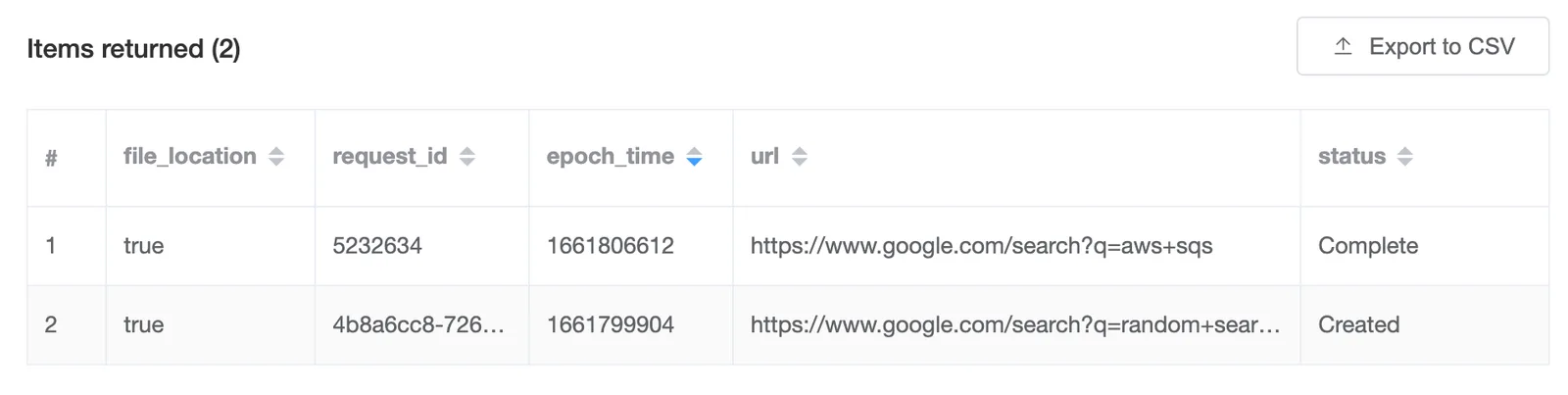
Deploying the changes
Deploy the changes to aws with the following command -
sam deployThe output should look like this -
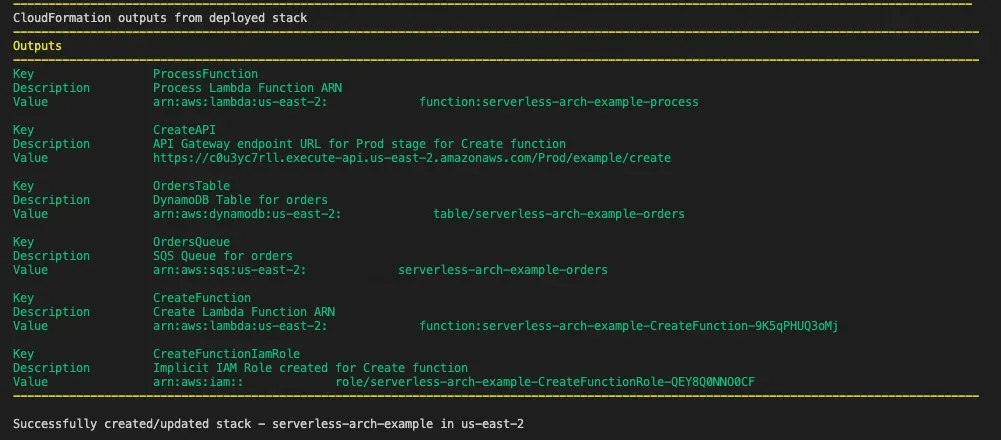
Just like before, test the changes by triggering a request for postman & validating the data in the dynamodb table -
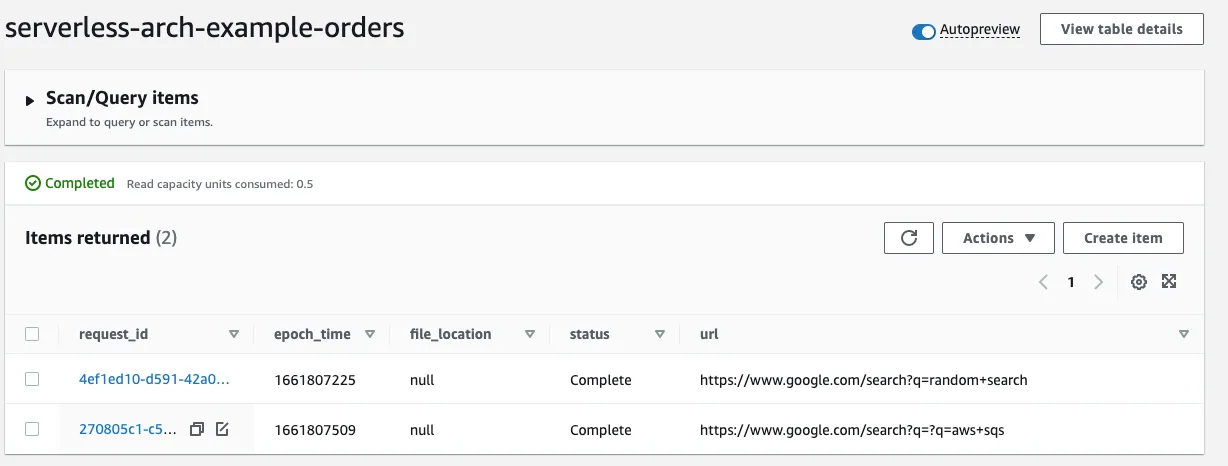
You’ll notice that the message from the last test was also processed successfully.
Source Code
Here is the source code for the project created here.
Next: Part 5: Writing a CSV to S3 from AWS Lambda